Updated October 2026 · about 7 minute read
The right accounting software saves hours every month, keeps you tax-ready and helps you see whether the business is actually making money. The wrong choice means messy books, surprise bills and a painful migration later. This guide compares ten popular options, with honest notes on who each suits.
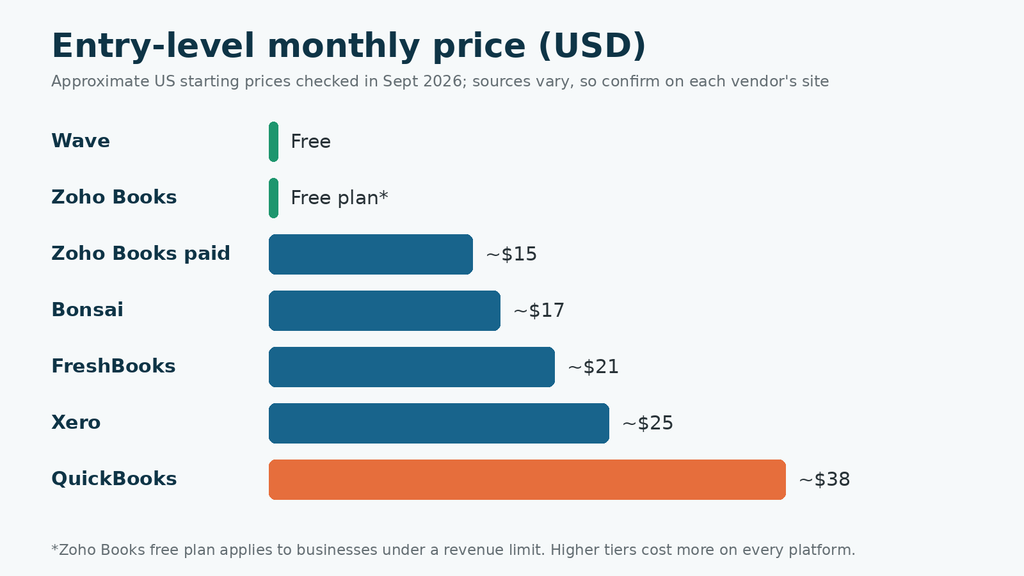
A quick note on prices: I checked current pricing pages and reviews in September 2026, and sources disagreed, especially for higher QuickBooks tiers after a 2026 repricing. So the prices here are approximate US starting prices. Always confirm the current cost and regional availability on each vendor’s site.
The top 10 compared
1. QuickBooks Online
Best for: businesses that want deep features and easy accountant access.
The most widely used option, with strong integrations, invoicing, bills, inventory on higher plans and wide accountant familiarity. The catch is cost: it is usually the priciest of the group, charges rise on higher tiers, and extra users can push you up a plan. Intuit repriced plans in 2026, so check the current price before you commit.
2. Xero
Best for: growing teams and businesses that work closely with accountants.
Xero stands out because every plan allows unlimited users, so it gets relatively cheaper as you add people. It has strong bank feeds, reporting and a large app marketplace. Plan limits on invoices and bills can matter at the lowest tier, and multi-currency sits on a higher plan.
3. FreshBooks
Best for: freelancers and service businesses that bill clients.
FreshBooks is known for polished invoicing, time tracking and client-friendly payments. It is easy to learn. Pricing tends to rise with the number of clients and extra users, so check limits if you plan to grow.
4. Zoho Books
Best for: small businesses already using Zoho apps, or those wanting a free start.
Zoho Books offers a free plan for very small businesses under a revenue limit, plus affordable paid tiers with automation and good value. It works best alongside other Zoho tools and can feel less natural outside that ecosystem.
5. Wave
Best for: freelancers and micro-businesses with basic needs.
Wave provides free accounting and invoicing. It makes money on optional services like payment processing and payroll, so read the fees. It is simple, but it lacks the depth, inventory and advanced reporting growing firms need.
6. Sage Accounting and Sage 50
Best for: businesses in regions where Sage is strong, or firms wanting a traditional approach.
Sage has a long history, especially in the UK, Europe and Africa, with cloud and desktop products. Features, names and pricing vary by country, so look up the version sold where you operate.
7. FreeAgent
Best for: UK freelancers, contractors and small companies.
FreeAgent is designed for freelancers and small firms, with a clean interface and tax features tailored to the UK. Some UK business bank accounts include it, so check before paying. It is less suited outside its home market.
8. Patriot Accounting
Best for: small US businesses that want simple software with payroll.
Patriot focuses on straightforward bookkeeping and payroll for small US employers. It is easy to use but less feature-rich and less widely supported than QuickBooks or Xero.
9. Bonsai
Best for: freelancers who want contracts, proposals and books in one place.
Bonsai combines client management, contracts, time tracking and invoicing with basic accounting. It suits solo service providers more than product businesses or growing teams.
10. GnuCash
Best for: technical users who want free, desktop-based double-entry accounting.
GnuCash is free, open-source and powerful, but it has a steeper learning curve and fewer built-in automations than cloud tools. Collaboration with an accountant is harder, so confirm they can work with exports.
Which one fits your situation?
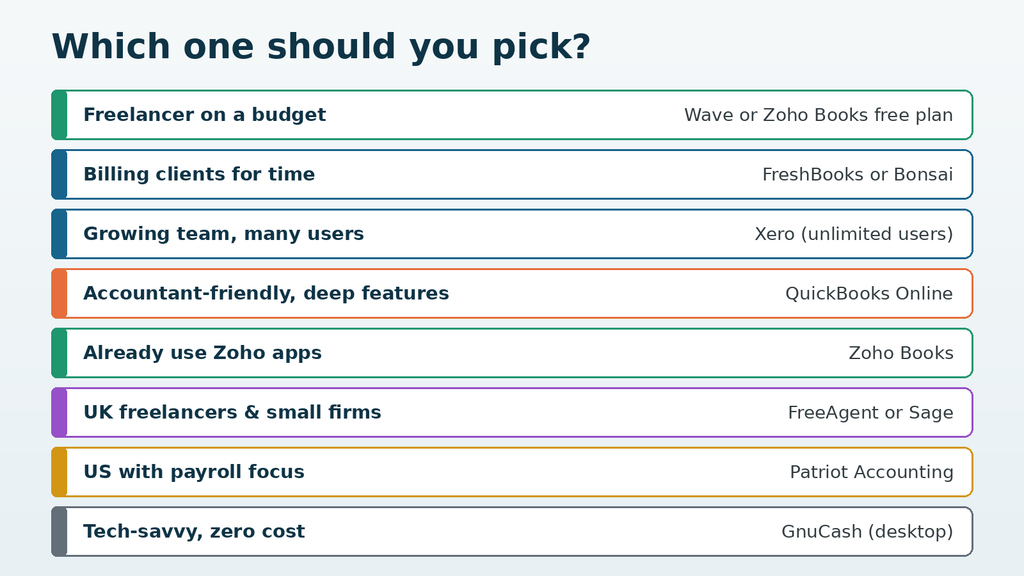
The chart below matches common situations to the options above. Use it as a shortlist, then test two or three with a free trial.
What to check before you choose
- Local tax support. Sales tax, VAT or GST rules, e-invoicing and filing requirements differ by country. Make sure the software supports yours.
- Bank feeds. Check that your bank connects, since reconciliation is where most time is saved.
- Users and accountant access. Some plans charge per user. Ask your accountant which tool they prefer.
- Invoices, bills and limits. Cheap plans often cap the number of invoices or bills.
- Payroll and inventory. These are often extra costs or higher-tier features.
- Exporting your data. You should be able to leave with your records if you switch.
Hidden costs to watch
Subscription price is only part of the bill. Payment processing fees, payroll add-ons, extra users, receipt scanning and advanced reports can double the monthly cost. Promotional discounts usually apply only for the first few months, and renewal prices can change. Look at the full-year cost, not just the headline offer.
Common mistakes when choosing accounting software
- Choosing only on price, then paying more later for users, payroll and add-ons.
- Buying a higher plan “to grow into” when a cheaper tier covers today’s needs. You can usually upgrade later.
- Skipping the free trial, so hidden limits only appear after you have entered months of data.
- Ignoring your accountant’s preferences, which can slow down tax season and raise their fees.
- Not reconciling bank accounts monthly, which makes any software useless.
Simple recommendations
If you are a freelancer or just starting, begin with a free or low-cost option such as Wave or Zoho Books. If you invoice clients for time, look at FreshBooks or Bonsai. If you have a team or work closely with an accountant, Xero and QuickBooks Online are the safest picks. A sensible path is to start free, then move to a fuller platform when you hire staff or your bookkeeping grows more complex.
How to switch without chaos
- Ask your accountant which platform they support best.
- Run a free trial with a month of real transactions.
- Set up your chart of accounts, tax settings and bank feeds.
- Import opening balances from your last closed period.
- Run both systems side by side for a month if you are migrating.
- Back up exports of reports before cancelling the old tool.
Choose the software that matches how your business works today, with room to grow for the next two or three years. Test it, check the true cost and make sure your accountant is comfortable with it.
General information only, not accounting, tax or financial advice. Features, plans and prices change often and vary by country; confirm details on each vendor’s website.
Please wait…
Your Code
This code is fixed and not randomly generated.