Updated October 2026 · about 7 minute read
Your web host affects how fast your WordPress site loads, how often it goes offline and how quickly you get help when something breaks. The cheapest plan is rarely the best value, and the most expensive is rarely necessary for a new site. This guide compares popular hosts on speed, price and support.
How this guide was made: I did not run hands-on speed tests myself. I compared recent 2026 reviews, benchmarks and pricing pages. The published results disagree widely. One benchmark ranks a host first for speed, while another puts the same host near the bottom. Many review sites also earn affiliate commissions, so I avoided exact rankings and used ranges. Later in the article I show how to test a host yourself, which is the only way to know how it performs for your site and audience.
What to look for in WordPress hosting
- Speed. Look at server response time (TTFB), caching, a built-in CDN and modern PHP versions. A fast server helps, but a heavy theme can still slow your site.
- Uptime. Most good hosts claim 99.9% or better. Even 99.9% means almost nine hours of downtime a year.
- Support. Live chat is standard. Check whether agents know WordPress or simply read scripts. Phone and ticket support matter in emergencies.
- Real price. Compare the renewal price, not just the first-year offer, and note extra fees for backups, email or migrations.
- Backups and security. Daily backups, malware scanning and a free SSL certificate should be included.
- Server location. Pick a data center close to most of your visitors.
7 WordPress hosts compared
1. Hostinger
Best for: budget WordPress sites.
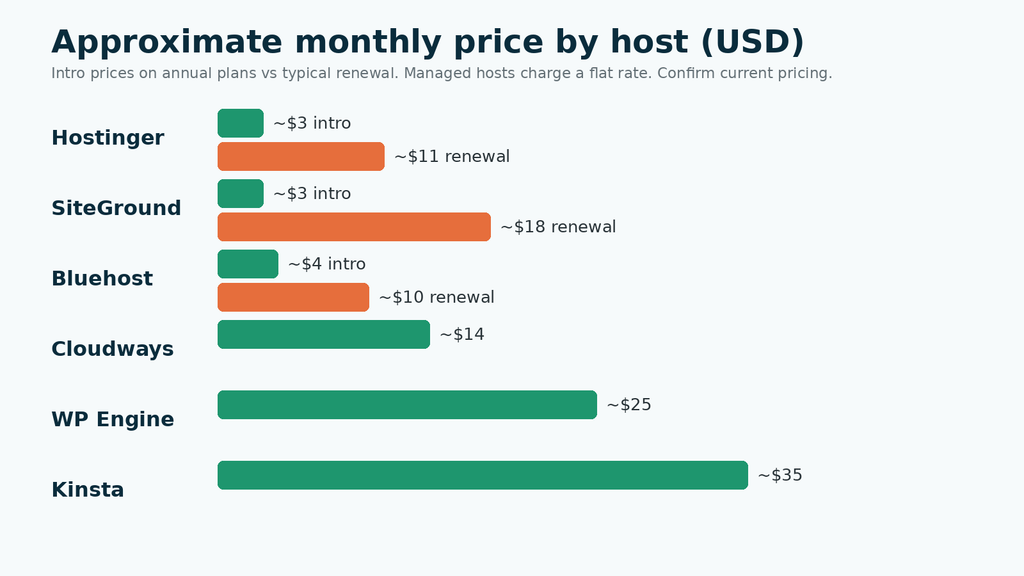
Hostinger is among the cheapest options, with intro pricing around $3 a month that renews at roughly $11. Independent tests generally show solid speed for the price, with uptime a touch below the very best. Support is available around the clock by chat, but quality is described as more variable than premium hosts, and there is no phone line.
2. SiteGround
Best for: beginners and small businesses who value support.
SiteGround is consistently praised for helpful WordPress support and reliable uptime, and it includes staging and free migration help. The catch is renewal: intro prices near $3 a month climb to roughly $18, so budget for year two. Performance results vary by test, but it is usually near the top of shared hosts.
3. Bluehost
Best for: first-time site owners who want an easy setup.
Bluehost is officially recommended by WordPress.org and has a very beginner-friendly onboarding. Uptime and speed are usually acceptable rather than outstanding in independent tests, and some reviewers mention longer support waits. Intro prices start around $3 to $4, with renewals around $10.
4. Cloudways
Best for: growing sites that want flexibility and a server near their audience.
Cloudways lets you run WordPress on cloud servers from providers such as DigitalOcean, and you pay for the server size you choose. Plans typically start at about $14 a month. It is faster and more flexible than shared hosting, but it requires a bit more technical comfort.
5. Kinsta
Best for: high-traffic sites and WooCommerce stores.
Kinsta is premium managed hosting built on Google Cloud, usually near the top of speed tests, with strong tooling and expert support. Plans start around $35 a month and rise with traffic and number of sites. It is overkill for a brand-new blog.
6. WP Engine
Best for: agencies and businesses that want enterprise-grade features.
WP Engine is a long-established managed WordPress host with strong team workflows, staging and security features. Plans start in the region of $20 to $30 a month. It is one of the few managed hosts known for phone support, though results in speed tests differ widely between reviewers.
7. DreamHost
Best for: people who want a WordPress.org-recommended host with a flexible billing option.
DreamHost is another host recommended by WordPress.org and offers shared and managed WordPress plans. Because I could not verify current speed and pricing data, check its pricing page and recent independent reviews before deciding.
Shared, cloud or managed: what is the difference?
Shared hosting puts many sites on one server. It is cheap and fine for small sites, but a busy neighbor can slow you down. Cloud hosting gives you a dedicated slice of a server, more consistent speed and room to scale, at a higher price and with a steeper learning curve. Managed WordPress hosting is tuned specifically for WordPress, with built-in caching, staging, automatic updates, security and expert support. It costs the most, but it saves time if your site earns money or you do not want to maintain servers yourself.
What the speed data really tells you
Reviewers typically report that managed hosts such as Kinsta and WP Engine and cloud options like Cloudways deliver faster server response than entry-level shared plans. But the gaps are often small for a simple blog, and results change with test location, theme, plugins and caching. A shared host with good caching can feel fast enough for a site with a few thousand monthly visitors. Speed differences matter most for stores, membership sites and high-traffic publishers.
How to test a host yourself
- Choose two or three hosts with a money-back guarantee.
- Install the same WordPress theme and plugins on each.
- Test speed with Google PageSpeed Insights and GTmetrix, and note TTFB from several locations.
- Monitor uptime for a couple of weeks with a free tool such as UptimeRobot.
- Contact support with a real question and judge how fast and how useful the answer is.
- Check renewal pricing before you commit to a long term.
Mistakes to avoid
- Picking a host only on the intro price, then facing a large renewal bill.
- Paying for premium managed hosting before you have traffic that needs it.
- Buying a three-year plan before testing performance and support.
- Blaming the host for slowness caused by oversized images or too many plugins.
- Ignoring backups. Make sure you can restore a clean copy yourself.
- Choosing a data center far from your readers.
Simple recommendations
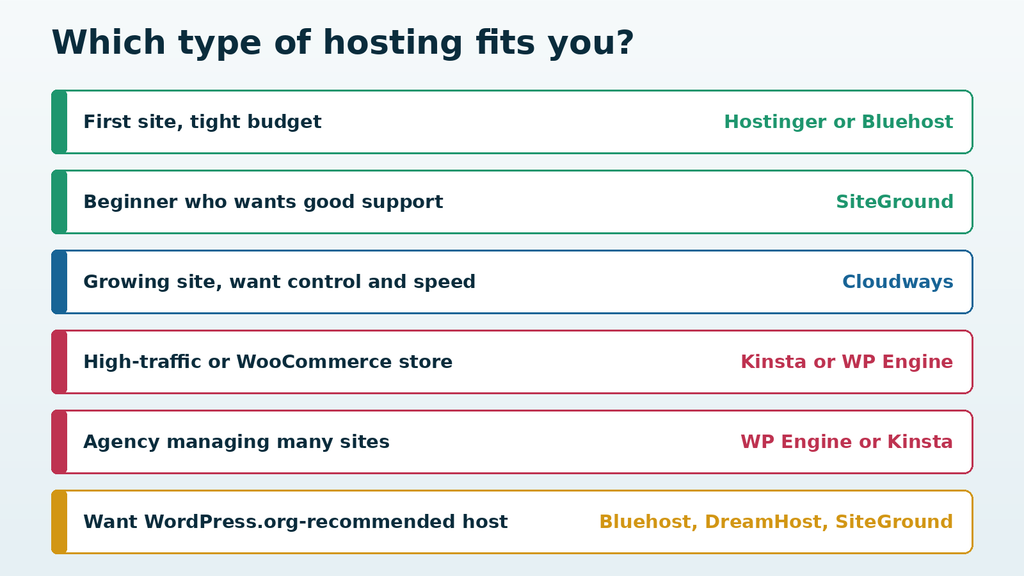
For a first blog on a budget, Hostinger or Bluehost keep costs low. If you want better support and can accept a higher renewal, SiteGround is a strong choice. If your site is growing, Cloudways gives more control without the premium managed price. For serious ecommerce or high-traffic sites, Kinsta and WP Engine justify their cost. Start with the smallest plan that meets your needs and upgrade when traffic demands it.
General information only. Prices, plans and performance change often and vary by region; confirm current details on each provider’s site and test before committing to a long contract.
Please wait…
Your Code
This code is fixed and not randomly generated.