Updated October 2026 · about 7 minute read
Email is still one of the most reliable ways to reach customers, because you own the list instead of renting attention from a social platform. The hard part is choosing a tool. Free plans have changed a lot, and some well-known names now offer far less than they once did. This guide compares ten beginner-friendly options and explains how to choose.
A note on accuracy: I checked recent 2026 pricing guides, and vendors changed their free plans several times this year, notably Mailchimp early in the year and MailerLite in mid-year. Treat the numbers below as approximate and confirm them on each vendor’s pricing page before signing up.
What beginners should look for
- Free-plan limits. Check subscribers, monthly sends and daily caps. A big contact allowance means little if sends are tightly limited.
- Ease of use. A drag-and-drop editor, ready templates and sign-up forms save hours.
- Automation. A welcome email sequence is the most valuable first automation. Some free plans exclude it.
- Branding. Free plans often add the vendor’s logo to your emails, and some do not let you remove it.
- Upgrade cost. A cheap start is worthless if prices jump when your list grows.
- Deliverability and compliance. Good tools handle unsubscribe links and authentication, which helps your emails reach inboxes.
The 10 best email marketing tools for beginners
1. Brevo
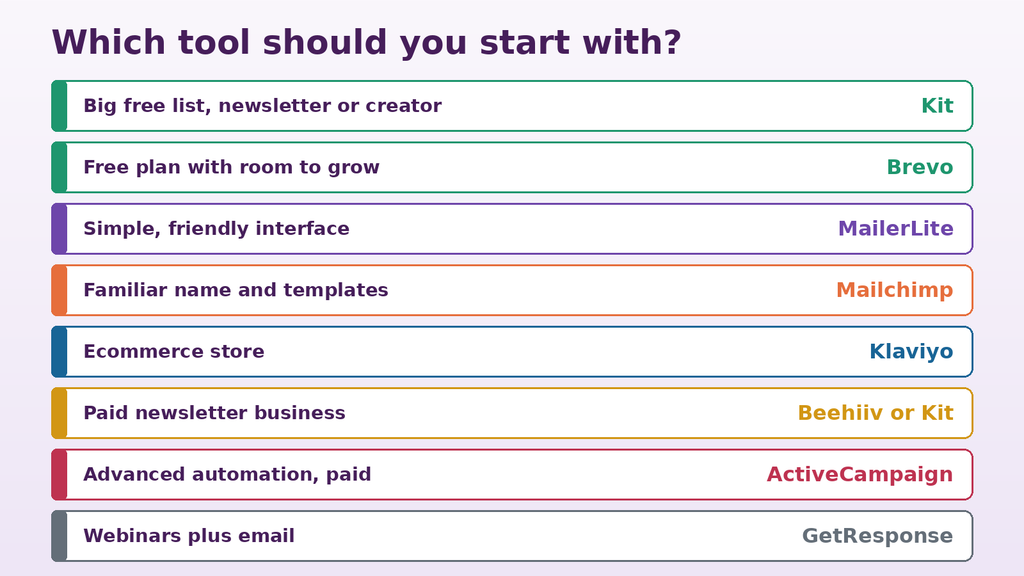
Best for: a free plan with room to grow.
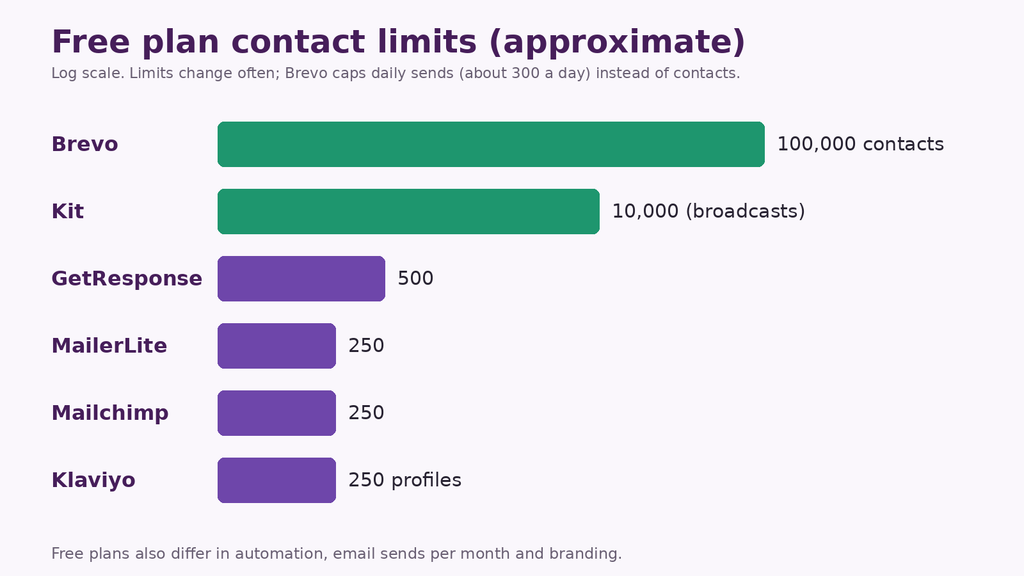
Brevo’s free plan allows a very large contact list but caps sending at roughly 300 emails a day, so it suits small, infrequent sends. It also covers SMS, basic automation and a CRM. Paid plans start around $9 a month and price by email volume rather than contacts. Removing Brevo branding usually costs extra.
2. MailerLite
Best for: beginners who want a clean, simple interface.
MailerLite is easy to learn and includes landing pages, forms and automation. Its free plan was cut in mid-2026 to about 250 subscribers and 2,500 emails a month, so it works for a small start. Paid plans begin at roughly $10 a month, and free-plan branding cannot be removed.
3. Kit (formerly ConvertKit)
Best for: creators and bloggers with growing lists.
Kit’s free plan has the biggest subscriber allowance here, up to about 10,000, but it focuses on broadcasts with limited automation. It is built around creators, with forms, landing pages and a way to sell digital products. Paid plans cost noticeably more than rivals, and selling through Kit adds transaction fees.
4. Mailchimp
Best for: people who want a familiar name and polished templates.
Mailchimp is the best-known tool, with many integrations and templates. However, its free plan has shrunk to about 250 contacts and 500 sends a month, and automation is mostly reserved for paid plans. Paid plans start near $13 a month, and costs rise as your list grows.
5. Beehiiv
Best for: newsletter publishers.
Beehiiv is built for newsletters, with growth tools, referral features and options for paid subscriptions. A free plan exists for starting out, but advanced features sit on paid tiers. Check current limits before you commit.
6. Sender
Best for: budget-conscious beginners.
Sender offers a free plan and low-priced paid tiers with automation and forms. It suits small businesses that want to keep costs low. Review the current free limits and support options before you build your list there.
7. EmailOctopus
Best for: simple, low-cost newsletters.
EmailOctopus focuses on affordability and stays inexpensive as lists grow. It has fewer built-in extras than all-in-one tools, which keeps things simple for basic sending.
8. GetResponse
Best for: marketers who want webinars and email together.
GetResponse combines email, landing pages and webinar tools. Its free plan allows about 500 contacts, and paid plans add automation and larger limits. It has more features than a pure beginner may need.
9. Klaviyo
Best for: online stores.
Klaviyo connects deeply with ecommerce platforms and uses shopping behavior to trigger emails such as abandoned-cart reminders. A free plan starts at around 250 profiles. Costs can climb quickly as your store’s list grows.
10. ActiveCampaign
Best for: advanced automation once you outgrow the basics.
ActiveCampaign is a powerful paid platform with sophisticated automation and CRM features. It can overwhelm absolute beginners and usually offers a trial rather than a permanent free plan, so consider it once your list and workflows are more complex.
Free versus paid: when to upgrade
Start free if you have fewer than a few hundred subscribers and need basic newsletters. Upgrade when you need automation, remove branding, send more often, segment your list or get faster support. Paid plans for beginners typically start around $9 to $15 a month and rise with list size or sending volume, so compare costs at the list size you expect in a year, not just today.
How to get started in a week
- Pick one tool and create your account. Do not spend weeks comparing.
- Verify your sending domain or email address so messages are trusted.
- Create a sign-up form and a simple lead magnet, such as a checklist or guide.
- Write a welcome email and, if allowed, a short three-email sequence.
- Add a sign-up link to your website, social bios and email signature.
- Send your first newsletter and review opens, clicks and unsubscribes.
Rules you must follow
Only email people who have agreed to hear from you. Include a clear unsubscribe link and your physical or mailing address where the law requires it. Laws such as CAN-SPAM in the US and GDPR in Europe have specific rules, and penalties can be serious. Using double opt-in, where subscribers confirm their address, keeps your list clean and your deliverability strong.
Beginner mistakes to avoid
- Buying email lists. It harms deliverability and breaks most tools’ rules.
- Choosing a tool only for its free plan, then facing a costly upgrade or painful migration.
- Sending rarely, so subscribers forget who you are. A consistent schedule, even monthly, works better.
- Ignoring subject lines and the first line of the email, which decide whether people open and read.
- Skipping a welcome email, the highest-engagement message you will send.
- Never cleaning your list. Remove inactive subscribers occasionally to protect your reputation.
The best tool is the one you will actually use consistently. Pick a reputable platform that matches your current size, build your list with a clear reason to subscribe, and revisit your choice once a year.
General information only. Features, free-plan limits and prices change often and vary by region; confirm current details on each vendor’s website and check the email laws that apply to you.
Please wait…
Your Code
This code is fixed and not randomly generated.